How to disable our triggers in SQL db.
There are triggers installed on 5 tables in Sage that updates the FYIsoft's RDM_Prod SQL database.
GL_Account
GL_DetailPosting
GL_MainAccount
GL_PeriodBudgetDetail
GL_PeridPostingDetail
GL_SubAccount
If the database were moved to the new server, you will need to manually disable the triggers from these tables:
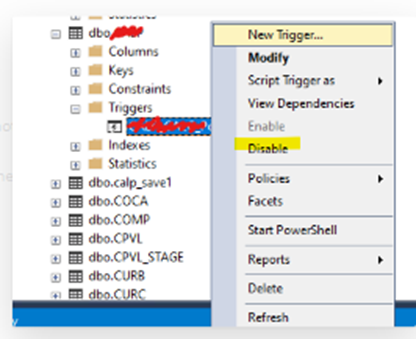
From SQL Server Management Studio, find the Sage table. Expand to find the DCFYI trigger, then right click to disable from the sub menu.
Alternatively, you can move the RDM_Prod database to the new server. The Sage_User group will need read/write access to RDM_Prod.
Was this article helpful?
That’s Great!
Thank you for your feedback
Sorry! We couldn't be helpful
Thank you for your feedback
Feedback sent
We appreciate your effort and will try to fix the article