If a Report Request is not processing (or distributing), it could because the ReportFYI Generation and Distribution Services need to be restarted.
On the server where the Generation and Distribution Windows services are running, do the following:
Open the Administrative Tools folder
Click “Services”
Find the “Renovofyi (ReportFYI) Distribution” service
Right-click the service
Select “Stop”
After the service stops, right-click it again
Select “Start”
If the credentials are valid, the service should restart
Perform the same steps for the Renovofyi (ReportFYI)Generation service
Open Renovofyi
Click “Manage”
Click “Status” (upper right side)
Make sure the status indicators for the services are green (top center of page)
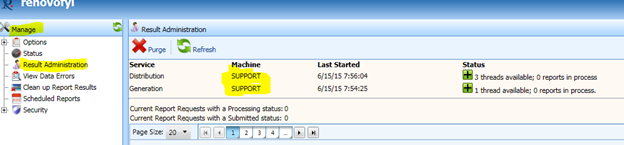
Note: If the Services do not appear on the Services window.
Look at the Status screen in Renovofyi (ReportFYI). Your services are listed at the top of the page along with a status indicator and a server name. That server name is where the services reside.
Was this article helpful?
That’s Great!
Thank you for your feedback
Sorry! We couldn't be helpful
Thank you for your feedback
Feedback sent
We appreciate your effort and will try to fix the article